
These HTML MCQ questions come in a quiz with a pool of 25 questions on HTML tags, links and images, lists and tables, forms, block and inline elements and HTML5 basics. They are made for diploma, engineering, BCA and BCS students and freshers preparing for a web development interview or exam. Every attempt gives you 10 random questions from the pool. Answer them, press Submit, and you will see your score, which answers were right or wrong, and a short explanation for each one.
Take the HTML MCQ Quiz
What These HTML MCQ Questions Cover
- Page structure: the doctype,
<head>,<title>, headings and comments. - Links, images and lists:
<a>withhrefandtarget,<img>withsrcandalt, and ordered and unordered lists. - Tables and forms: table rows and cells,
<select>,<fieldset>, buttons and the form method. - Layout and HTML5: block and inline elements, void elements, semantic tags,
id,<noscript>and thedeferattribute.
HTML Basics: Key Points to Revise
These short notes cover everything the quiz tests. They do not give away the quiz answers, but if you understand them, you can answer every question. The correct answers and explanations appear after you submit the quiz.
The structure of an HTML page
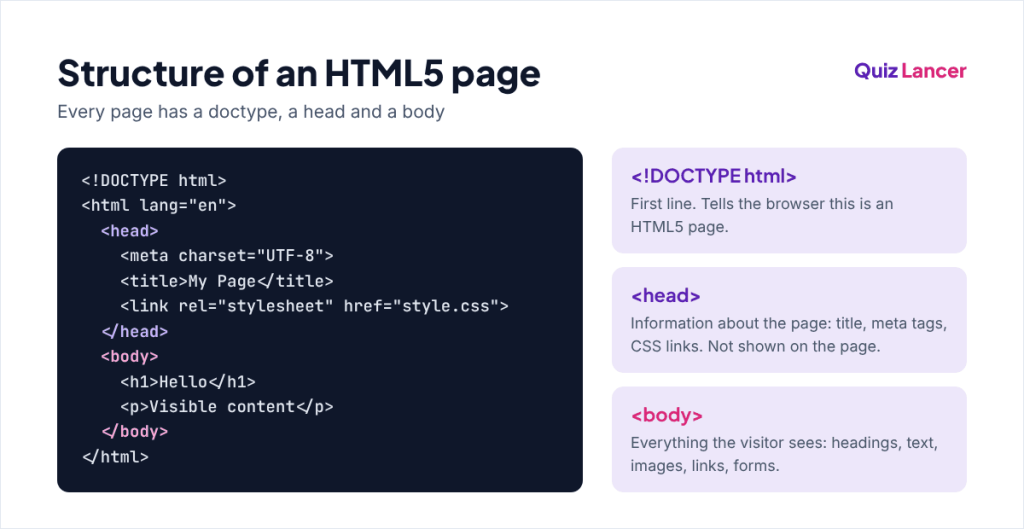
HTML is a markup language: it uses tags to describe the parts of a page. Every HTML5 page starts with a doctype, then an <html> element with two parts. <head> holds information about the page, such as the title, meta tags and stylesheet links. <body> holds everything the visitor sees.
Tags, attributes and void elements
Most elements have an opening and a closing tag, like <p>...</p>. Attributes go inside the opening tag and add extra information, for example href on a link or src and alt on an image. A few elements, called void elements, cannot hold content and have no closing tag: <br>, <img>, <input>, <meta>, <link> and <hr>.
Block and inline elements
A block-level element, such as <div>, <p>, <h1> or <ul>, starts on a new line and takes the full width. An inline element, such as <span>, <a>, <strong> or <img>, stays inside the line of text and takes only the width it needs. CSS can change this with the display property. Read more in our guide to block-level and inline elements in HTML.
Tables and lists
A table is built from rows and cells: <table> holds <tr> rows, and each row holds <th> heading cells or <td> data cells. Lists come in two main types: <ol> for numbered steps and <ul> for bullet points. Both use <li> for every item.
Form basics
A <form> sends its data to the URL in its action attribute, using the method in its method attribute. GET puts the data in the URL and POST sends it in the request body. <select> with <option> items makes a drop-down list, and <fieldset> with a <legend> groups related fields. Be careful with buttons: a <button> inside a form submits it unless you set its type. Our HTML input types MCQ covers form fields in more detail.
id, class and semantic elements
An id must be unique on the page, while a class can be used on many elements. Semantic elements such as <header>, <nav>, <main>, <section>, <article> and <footer> describe what their content is, which helps search engines and screen readers. <div> and <span> have no meaning and are used only for grouping and styling.
Scripts: defer and noscript
A normal <script> tag stops the page from loading while the script downloads and runs. Adding defer lets the browser download the script in the background and run it after the HTML has been read. The <noscript> element holds content that is shown only when JavaScript is turned off. You can check any tag in the MDN HTML elements reference.
How to Score Better Next Time
- Try every tag yourself: save a file as
test.html, open it in Chrome and press F12 to see the elements. - Learn the void elements and the default display of common tags. Many questions depend on them.
- Read the explanation of every question you got wrong on the result page, then retake the quiz for a new set of 10.
Frequently Asked Questions
Is HTML a programming language?
No. HTML is a markup language. It describes the structure and content of a page, but it has no variables, conditions or loops. Logic on a web page is written in JavaScript, and the look is controlled with CSS.
What is the difference between <head> and <header>?
<head> holds information about the page that visitors do not see, such as the title and meta tags. <header> is a visible semantic element for the top part of a page or section, such as a logo and menu.
Where can I see the correct answers?
Press Submit at the end of the quiz. The result page shows your score, the correct answer for every question and a short explanation. The answers are not listed on this page so that you test yourself first.
Conclusion
These HTML MCQ questions tested the basics that come up in almost every web development interview: page structure, links and images, tables and forms, block and inline elements and HTML5 tags. If you scored 8 or more out of 10, retake the quiz once or twice to see new questions from the pool of 25. If not, read the key points again, try the tags in a test file, and try again.
Keep practising HTML
Get one new quiz every week. Join Quiz Lancer on Telegram →

Full-stack developer with 5+ years of experience in PHP, Laravel and JavaScript. I create these quizzes to help students and freshers prepare for web development interviews.