This JavaScript operators MCQ quiz has a pool of 25 questions on arithmetic and comparison operators, == vs ===, logical operators, truthy and falsy values, and conditions like if...else, the ternary operator and switch. It is made for freshers and computer students preparing for a JavaScript interview. Every attempt gives you 10 random questions from the pool. Answer them, press Submit, and you will see your score, which answers were right or wrong, and a short explanation for each one.
This is part 2 of our JavaScript quiz series. If you have not done part 1 yet, start with the JavaScript basics MCQ quiz on variables and data types, because many operator questions depend on data types.
Take the JavaScript Operators MCQ Quiz
What This Quiz Covers
Most questions ask “What is the output of this code?”, because interviewers love small operator puzzles. The questions come from these topics:
- Arithmetic and assignment operators:
+,-,%,**,++,--,+=and how+behaves with strings. - Comparison operators:
==,===,<and>, including the special cases ofnull,undefinedandNaN. - Logical operators:
&&,||,!and??, and truthy and falsy values. - Conditions:
if,else if,else, the ternary operator andswitch.
Difference Between == and === in JavaScript
This is the most asked question in any JavaScript operators MCQ test. == (loose equality) first converts both values to the same type and then compares them. === (strict equality) compares the value and the type, and never converts anything.
| Feature | == (loose) | === (strict) |
|---|---|---|
| Checks the value | Yes | Yes |
| Checks the type | No | Yes |
| Converts types before comparing | Yes | No |
1 == true / 1 === true | true | false |
Used by switch | No | Yes |
| Use in real code | Rarely | Always, by default |
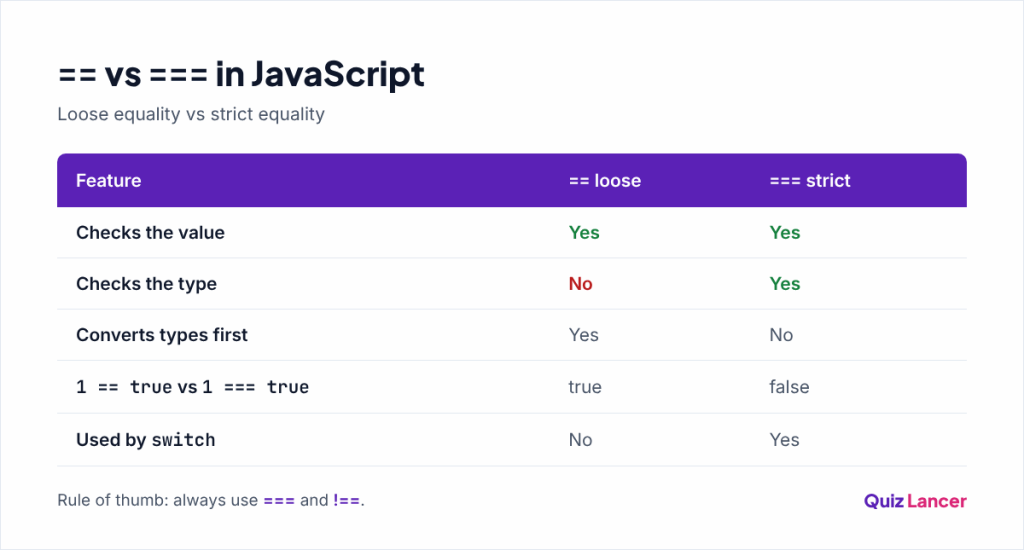
A simple rule: always use === and !==, unless you have a clear reason to want type conversion. You can read the full conversion rules in MDN’s guide to equality comparisons, the standard JavaScript reference.
JavaScript Operators: Key Points to Revise
These short notes cover everything the quiz tests. They do not give away the quiz answers, but if you understand them, you can answer every question. The correct answers and explanations appear after you submit the quiz.
The + operator and strings
+ is the only arithmetic operator that also joins strings. If either side is a string, the other side becomes a string too. The other operators (-, *, /, %) always try to turn both sides into numbers. Operators of the same level run from left to right, so the order of the values matters.
Remainder, exponent and assignment
% gives the remainder after division, which is useful for checking even and odd numbers. ** raises a number to a power. Short forms like +=, -= and *= update a variable using its own value: a += 2 is the same as a = a + 2.
Prefix and postfix increment
Both ++i and i++ add 1 to i. The difference is the value the expression gives back: the prefix form ++i adds first and gives the new value, while the postfix form i++ gives the old value and adds afterwards.
let n = 1;
let p = n++;   // p is 1, n is now 2
let q = ++n;   // n is now 3, q is 3
Comparing strings, null and NaN
When both sides of < or > are strings, JavaScript compares them character by character, like words in a dictionary, not as numbers. null and undefined follow their own special rule with ==. NaN is never equal to anything, so check for it with Number.isNaN(). A comparison always gives a boolean, true or false.
Truthy and falsy values
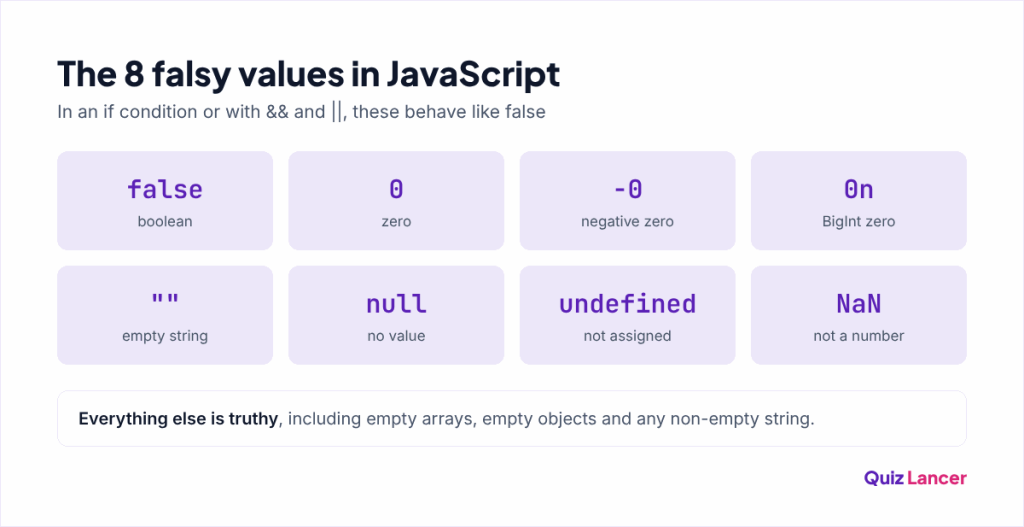
Conditions and logical operators treat every value as either truthy or falsy. There are only 8 falsy values. Everything else is truthy, including every object and array, even empty ones, and every non-empty string.
Logical operators return values, not just true or false
|| returns the first truthy value, or the last value if none is truthy. && returns the first falsy value, or the last value if all are truthy. Both stop as soon as the answer is known, which is called short-circuiting. ?? is stricter than ||: it falls back only when the left side is null or undefined, so values like 0 and "" are kept. ! flips a value to the opposite boolean.
if, else if and the ternary operator
In an if...else if...else chain, JavaScript checks the conditions from top to bottom and runs only the first block whose condition is truthy. The ternary operator condition ? valueIfTrue : valueIfFalse is a one-line if...else that gives back a value. Be careful not to write = (assignment) inside a condition when you mean ===.
How switch works
switch compares its value with each case using strict equality (===). After a match, it keeps running the following cases until it reaches a break. This “fall-through” is the source of many interview questions. The default block runs when no case matches.
How to Score Better Next Time
- Run every code question yourself in the browser console (press F12 and open the Console tab).
- Learn the 8 falsy values by heart. Many questions on
||,&&andifdepend on them. - For every
switchquestion, look for the missingbreakfirst. - Read the explanation of every question you got wrong on the result page, then retake the quiz for a new set of 10.
If your interview also covers web basics, practise with our HTML MCQ questions. For the complete list of operators, see the MDN operators reference.
Frequently Asked Questions
How many types of operators are there in JavaScript?
The main groups are arithmetic, assignment, comparison, logical, string, conditional (ternary), bitwise and type operators like typeof. This quiz covers the ones asked most in fresher interviews: arithmetic, assignment, comparison, logical and the ternary operator.
Should I use == or === in JavaScript?
Use ===. It compares both value and type, so there are no surprises from type conversion. Most style guides and linters flag == as a possible bug.
What is the difference between || and ?? in JavaScript?
|| uses the right side whenever the left side is falsy, such as 0, "" or false. ?? uses the right side only when the left side is null or undefined. Use ?? for default values when 0 or an empty string is a valid value.
Where can I see the correct answers?
Press Submit at the end of the quiz. The result page shows your score, the correct answer for every question and a short explanation. The answers are not listed on this page so that you test yourself first.
Conclusion
This JavaScript operators MCQ quiz tested the operator and condition rules that interviewers use in short output questions: + with strings, == vs ===, truthy and falsy values, logical operators and switch fall-through. If you scored 8 or more out of 10, retake the quiz once or twice to see new questions from the pool of 25. If not, read the key points again, run the code in your browser console, and try again.